Product Core Brief
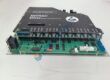
• Model: IS215UCVFH2AB • Brand: General Electric (GE) • Series: Mark VI Turbine Control • Core Function: Executes real-time turbine control algorithms and manages VMEbus communication. • Product Type: VME64 Controller / Processor Module • Key Specs: Dual VME slot width | High-performance processor | DLAN / Ethernet interfaces • Condition: New Original (New Surplus)
Product Introduction
GE IS215UCVFH2AB is a double-slot VME64 controller board designed for GE Mark VI turbine control systems. The controller manages high-speed logic, turbine protection algorithms, and real-time I/O processing across steam, gas, and hydro power applications.
This module provides high-throughput backplane communication and integrated Ethernet connectivity for IONet integration. Installing this unit maintains low-latency control loop execution while maintaining legacy compatibility with existing Mark VI rack architectures.
Quality Control & Testing Process
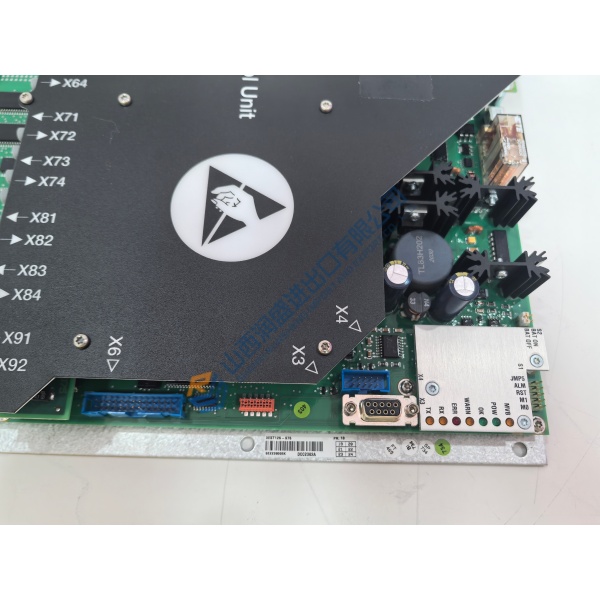
- Inbound Inspection: Trace origin documentation against packing lists. Verify anti-counterfeit markings, inspect the serial number label, and inspect PCB traces for corrosion or physical scratches. Confirm all terminal pin blocks and retention screws are present.
- Live Functional Testing: Mount the board into a functional Mark VI VME rack. Perform power-on self-test (POST), verify IONet and serial communication handshakes, perform full-scale analog and digital I/O simulation, and run a load test for >24 hours.
- Electrical Testing: Check power rail insulation resistance using a 500 V Megger to ensure reading exceeds 10 MΩ. Verify grounding continuity across all VME card cage shield contact points.
- Firmware Verification: Read and log the onboard firmware release version. Archive configuration settings and record DIP switch and jumper positions before repackaging.
- Final QC & Packaging: Enclose the board inside anti-static shielding bags. Wrap with industrial-grade bubble wrap, seal in a protective carton, and apply a QC Passed label.
Technical Pitfall & Installation Guide
• Firmware Rev Mismatch: A module with newer firmware can fail to sync with an existing Mark VI controller pair. Always read and record the firmware version on the active CPU before replacing this unit. • DIP Switch/Jumper Errors: Misconfigured jumpers will prevent system initialization or cause VMEbus addressing collisions. Photograph and mirror the exact jumper layout of the old module before installing the replacement. • Terminal/Wiring Incompatibility: Ensure the front-panel serial and Ethernet pinouts match your existing cable harnesses. Avoid running communication lines next to high-voltage AC cables to prevent ground loops. • Power Supply Constraints: Adding or swapping processor boards increases draw on the VME power supply rail. Verify total rack current draw leaves a 20% operating margin on the 5 V DC supply. • ESD Protection: Electrostatic discharge can permanently ruin onboard components. Always wear a grounded anti-static wrist strap when handling or inserting this module into the rack.
Frequently Asked Questions
Q: Does the IS215UCVFH2AB support live hot-swapping while the turbine is running? A: Honestly, you should never pull a primary VME controller while the rack is energized unless you are operating a fully redundant TMR (Triple Modular Redundant) system with proper procedures. Pulling a board without de-energizing or ensuring full redundancy can trip the turbine or damage the VME backplane pins.
Q: What is the most common mistake when replacing this controller board? A: In our experience, the most common mistake is ignoring the onboard jumper settings. Technicians often pull the unit out of the box and slide it directly into the rack, only to find the system cannot assign an IP address or locate the VME slot. Always match the hardware jumpers on the new board to the old unit before installation.
Q: Will I lose the turbine control program when swapping out this module? A: Yes, the control application resides in volatile memory or flash on the board itself. Before removing the old unit, save a complete backup of the application code via the GE Toolbox software. After inserting the replacement, reload the project configuration and verify parameters before initiating startup.
Q: Are these units factory-new or sourced from surplus? A: These boards are New Surplus, sourced directly from verified system integrator inventories, spare parts vaults, and canceled projects. They are uninstalled, original OEM hardware that undergoes full electrical and live rack testing before shipment to guarantee proper functionality.
Q: What should I check if the module fails to establish IONet communication upon power-up? A: Check the front panel LED indicators first to confirm the boot cycle completed. Next, verify that your network subnet settings match the Mark VI control network configuration and ensure the Ethernet port speed on your switch isn’t locked to an incompatible mode.