Description
Product Introduction
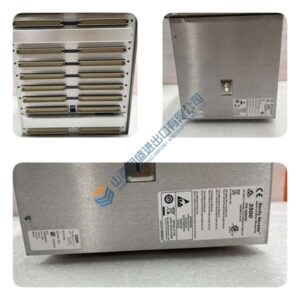
Running a fully populated Trusted T8100 rack and worried about thermal shutdown? The ICS TRIPLEX T8271 (PD-T8271) is the roof-mounted 24 VDC fan tray that forces 552 m³/h of cooling air across T8110B CPUs and T8xxx I/O modules.
This unit packs 8× Papst Type 8414NG fans (69 m³/h each) at 3,100 RPM, delivering directional airflow through the chassis backplane. In field deployments of offshore SIS racks, we’ve seen this tray hold internal temps below 50 °C even with five T8231 PSUs and 20+ I/O modules running. Dual 24 V DC supply inputs with 500 mA anti-surge fusing mean if one supply drops, the other keeps four fans spinning—no thermal trip.
Installation & Configuration Guide
Phase 1—Pre-Installation (est. 10 min)
De-energize the Trusted rack. Wait 5 minutes for capacitor discharge. Grab a 24 V DC multimeter, ESD wrist strap, and a camera. Photograph the existing T8271, TC-011-01 power cable routing, and terminal block wiring (SKT1/SKT2)—photo, photo, photo.
Phase 2—Removal (est. 5 min)
Label every 24 V DC power cable before disconnecting. Release the roof cowl mounting screws or latches. Slide the fan tray out carefully, keeping the connector intact. Inspect the fan blades for dust or damage.
Phase 3—Installation (est. 10 min)
Strap on your ESD gear. Verify the part number matches T8271 (PD-T8271). Slide the fan tray into the roof cowl, torque mounting screws to ~0.5 N·m. Reconnect TC-011-01 power cables to SKT1/SKT2 (observe pinout: Pin 1 = 24 V-1, Pin 2/3 = 0 V, Pin 4 = 24 V-2). Run a pre-power checklist: supply voltage 18–28 V DC, ground continuity, no loose strands.
Phase 4—Power-On & Testing (est. 15 min)
Apply 24 V DC ±10% to both supply inputs. Listen for fan startup (all 8 fans should spin within 2 seconds). Measure airflow with an anemometer (should read ~552 m³/h total). Verify no unusual vibration or noise. Confirm stable operation for at least 30 minutes. Log the swap in your maintenance record.
Troubleshooting quick-reference:
- Fans not spinning → check 24 V DC supply voltage and polarity (Pin 1/4 = +, Pin 2/3 = –)
- Partial fan operation (only 4 fans) → check dual supply inputs, verify 500 mA fuses intact
- Excessive noise/vibration → inspect fan blades for dust or damage, verify roof cowl is seated